
What does SubTrack Offer?
Features
SubTrack offers a wide range of features to manage your staff & subcontractors, timesheets and compliance. Simplicity is our number one design priority - helping you save time, money and increase your productivity.
Advanced Geofencing Technology
What is Geofencing?
Geofencing is like drawing an invisible circle on a map around the place where your workers need to be. When using SubTrack, this lets you check that your staff and subcontractors are only clocking in (starting work) and clocking out (ending work) when they're actually at the job site. This makes sure everyone is where they should be and helps keep work on track, making sure no one says they were at work when they weren't. It's a simple way to help your company run smoothly and honestly, designed to save you time, money and boost productivity.
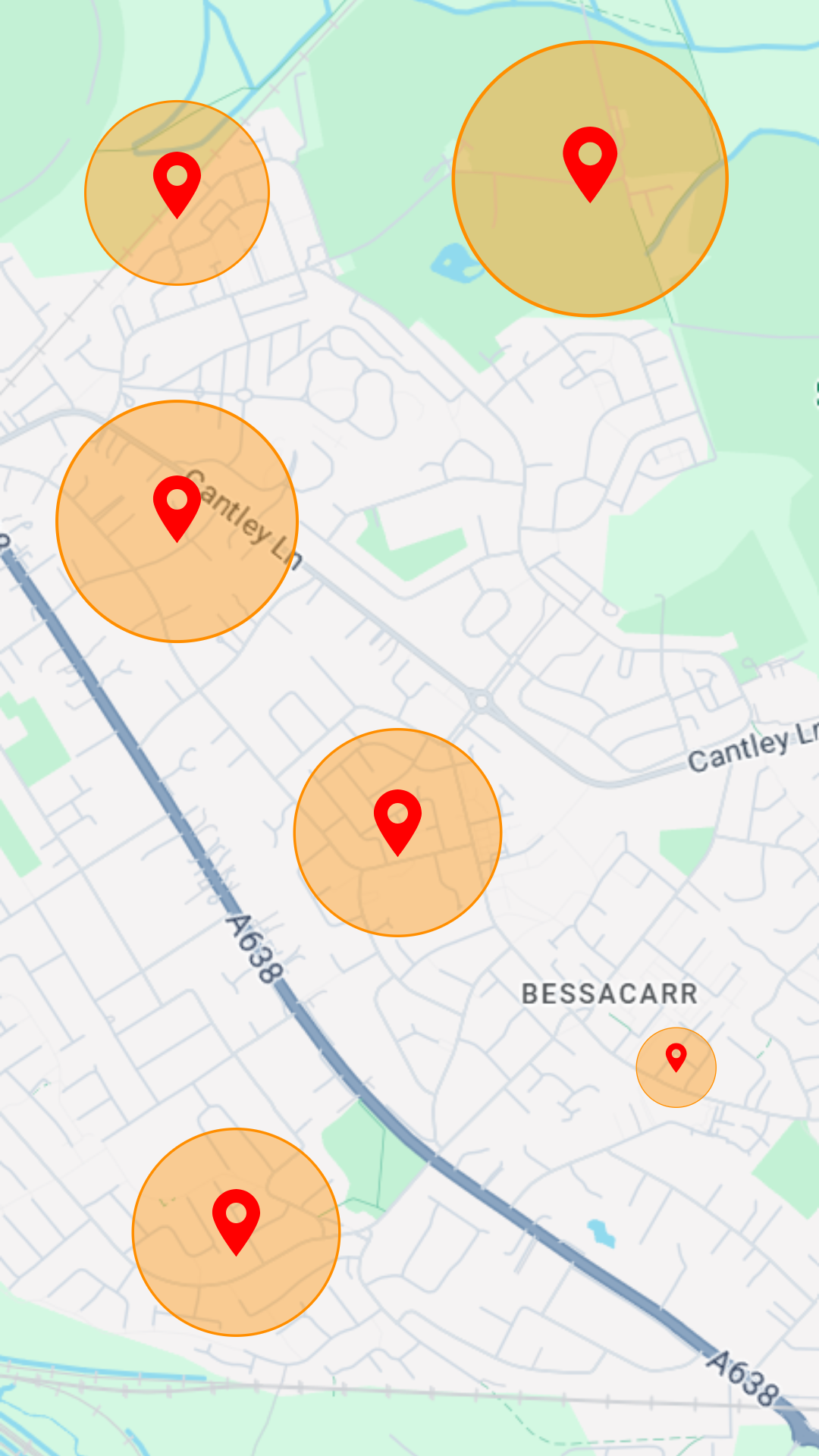
Customisable geofencing for diverse site requirements
Multi-Location Geofencing for Clocking in & Out
With SubTrack's Multi-Location Geofencing feature, you can tailor clock-in and clock-out zones to specific locations, accommodating the unique needs of different staff and varying times. This flexibility allows you to set distinct zones for starting and ending the workday, ensuring precise attendance tracking. For instance, a worker could be required to clock in at a specific job site but clock out from a different location if their tasks demand movement between sites. This adaptability is crucial for accurate timekeeping, enhanced compliance with workplace policies, and for saving money as it ensures staff are in the right place at the right time - recognising if they are not. This makes SubTrack an essential tool for managing mobile workforces efficiently. Geofencing uses GPS to create a virtual geographic boundary, or zone, enabling software to trigger a response when a mobile device enters or leaves a particular area.
Effortless and Accurate Digital Time Tracking
Auto-Timesheets
No more manual calculations! Auto-Timesheets in SubTrack transform how you manage staff hours by automatically generating digital timesheets based on real-time data. This feature ensures that every instance of clocking in and out is instantly captured and accurately recorded. For example, if a staff member clocks in late, this discrepancy is immediately reflected in their timesheet, ensuring that you only pay for actual hours worked. This precision eliminates the need for manual timesheet adjustments and enhances payroll accuracy, saving both time and money while ensuring fair compensation practices. It's an indispensable tool for maintaining clear and compliant labour records in any dynamic work environment.


Ensure Compliance with Customisable Task Completion
Pre & Post Work Protocols
SubTrack’s Protocols feature allows you to establish customisable actions that staff must complete before they can clock in or out. This capability is designed to enforce critical procedures such as vehicle checks, safety briefings, or any other essential tasks tailored to your specific operational needs. By setting these mandatory protocols, you ensure that all necessary pre or post-work conditions are met, enhancing safety and compliance across your projects. This feature is fully customisable, enabling you to adapt the requirements for different roles or job sites, ensuring that every team member starts and ends their shift only after fulfilling all designated preconditions.
Optimise Punctuality with Precision Scheduling
Time & Location Scheduling
SubTrack's Time and Location Scheduling feature enables you to precisely set and manage the clock-in & clock-out times and locations for each of your staff members. This functionality ensures that staff are aware of exactly when and where they are supposed to be on-site, which significantly reduces instances of lateness and unauthorised overtime. Each staff member receives a notification at their scheduled clock-in and clock-out times, reinforcing timely attendance and accountability. This system not only streamlines workforce management but also enhances operational efficiency by ensuring staff adhere to their designated schedules and locations.
Effortlessly Manage Staff Absences
Leave
Planning
SubTrack’s Leave Planning feature simplifies the process of scheduling time off for your staff. Integrated seamlessly within the time scheduling section, you can quickly mark days as 'leave' by checking the appropriate box. This update is instantly reflected in both the staff member’s upcoming schedule and their timesheet, ensuring clear communication and record accuracy. This visibility helps both managers and staff members stay informed about planned absences, aiding better workforce management and planning. It also streamlines the leave management process, reducing administrative workload and enhancing operational efficiency.
Streamline Processes with Flexible Export Options
Exportable
Timesheets
SubTrack's Exportable Timesheets feature allows for seamless conversion of digital timesheets into Excel format. This functionality significantly reduces payroll processing times by simplifying data handling and enhancing accessibility. This streamlined approach not only improves workflow but also boosts overall productivity, ensuring that administrative tasks do not hinder operational progress. Easily download timesheets for your entire workforce, teams or individual workers to make payroll processing easier. Don’t manage your own payroll? Simply send the zip files to your payroll company!
Correct Timesheets with Administrator Control
Manual Timesheet Override
SubTrack's Manual Timesheet Override feature gives administrators the ability to manually edit staff timesheets, ensuring accuracy and flexibility in timesheet management. This capability is crucial for correcting discrepancies or errors, like if a staff member forgets to clock out or if there's a mismatch in recorded hours. By allowing these adjustments, managers can ensure that timesheets accurately reflect the actual hours worked, maintaining fairness in payroll processing and compliance with labour regulations. This feature underscores SubTrack's commitment to providing robust, user-centric workforce management solutions.
Optimise Management with Team Grouping
Build Teams
SubTrack’s Team Builder facilitates the efficient grouping of staff into teams, enabling streamlined management of various operational aspects with just one click. By organising staff into defined teams, you can swiftly set and adjust clock in/out zones (geofences), schedules, pre-work protocols, forms, to-do lists, leave, and overtime. This centralised management approach not only saves time but also significantly enhances productivity by ensuring that entire teams are synchronised in their tasks and expectations. It simplifies administrative tasks and boosts team coordination, making it easier to maintain high levels of productivity across the board.
Manage Deviations and Staff Requests Effectively
Discrepancies & Requests
SubTrack’s Discrepancies and Requests feature provides a robust platform for addressing and managing any deviations or requests made by staff. This tool allows administrators to quickly view, accept, or deny occurrences such as late
clock-ins, attempts to clock in from outside designated zones (geofences), leave requests, or unplanned overtime. Effective management of these discrepancies ensures that payroll is accurate and that rules are consistently applied, enhancing operational efficiency and maintaining compliance with company policies. This feature streamlines the process of handling exceptions, making workforce management more responsive and accountable.
Streamline Operations with One-Click
Bulk Actions
SubTrack's Bulk Actions feature allows administrators to efficiently manage multiple aspects of workforce management for several staff simultaneously. With just a single click, you can set and update clock in/out zones (geofences), schedules, pre-work protocols, forms, to-do lists, leave, and overtime. This capability greatly reduces the time spent on repetitive administrative tasks. By enabling these mass updates, bulk actions not only enhance productivity but also ensure consistency and accuracy across your team's operations, facilitating smoother and more efficient project management.
Comprehensive Mobile Access for Enhanced Productivity
Mobile App
The SubTrack App equips workers with all the essential tools they need for effective time management and communication, accessible directly through their mobile device. This powerful app allows staff to clock in & out provided they are in the designated zones and have completed pre & post work protocols. They can pause time when necessary, or select 'Keep Working' to extend their hours for unplanned overtime. The app also provides access to previous timesheets, upcoming schedules, and enables staff to complete forms and submit requests. By centralising these functions into one intuitive, easy to use interface, the app not only enhances operational efficiency but also boosts health and safety compliance.